
 Krasimir Kazakov
c91987d8e8
feat: show song progress and scrolling now-playing title |
1 долоо хоног өмнө | |
|---|---|---|
| android | 1 долоо хоног өмнө | |
| assets | 1 долоо хоног өмнө | |
| docs | 1 долоо хоног өмнө | |
| lib | 1 долоо хоног өмнө | |
| test | 1 долоо хоног өмнө | |
| tool | 1 долоо хоног өмнө | |
| .gitignore | 1 долоо хоног өмнө | |
| .metadata | 1 долоо хоног өмнө | |
| AGENTS.md | 1 долоо хоног өмнө | |
| README.md | 1 долоо хоног өмнө | |
| analysis_options.yaml | 1 долоо хоног өмнө | |
| pubspec.lock | 1 долоо хоног өмнө | |
| pubspec.yaml | 1 долоо хоног өмнө |
README.md
CarDash
A calm, configurable Android car dashboard launcher, built with Flutter.
CarDash replaces the tablet home screen with one landscape page: a large clock, battery and Wi-Fi status, a now-playing media card, and up to 16 buttons — Navigation, Music, Radio, Settings, All apps, plus any apps you pin from All Apps. The first three can be shown, hidden and assigned to installed apps. External apps open full-screen using the normal Android launcher mechanism. No overlays, no root, no kiosk setup.
Verified on Android 15 and Android 10 tablet emulators at 1280×800 and 1024×600. Runs on a physical Android 17 HyperOS tablet. OBD-II UI/parser is implemented; the ELM327 socket path still needs a real-car test. Landscape only.
Screenshots
| Light | Dark |
|---|---|
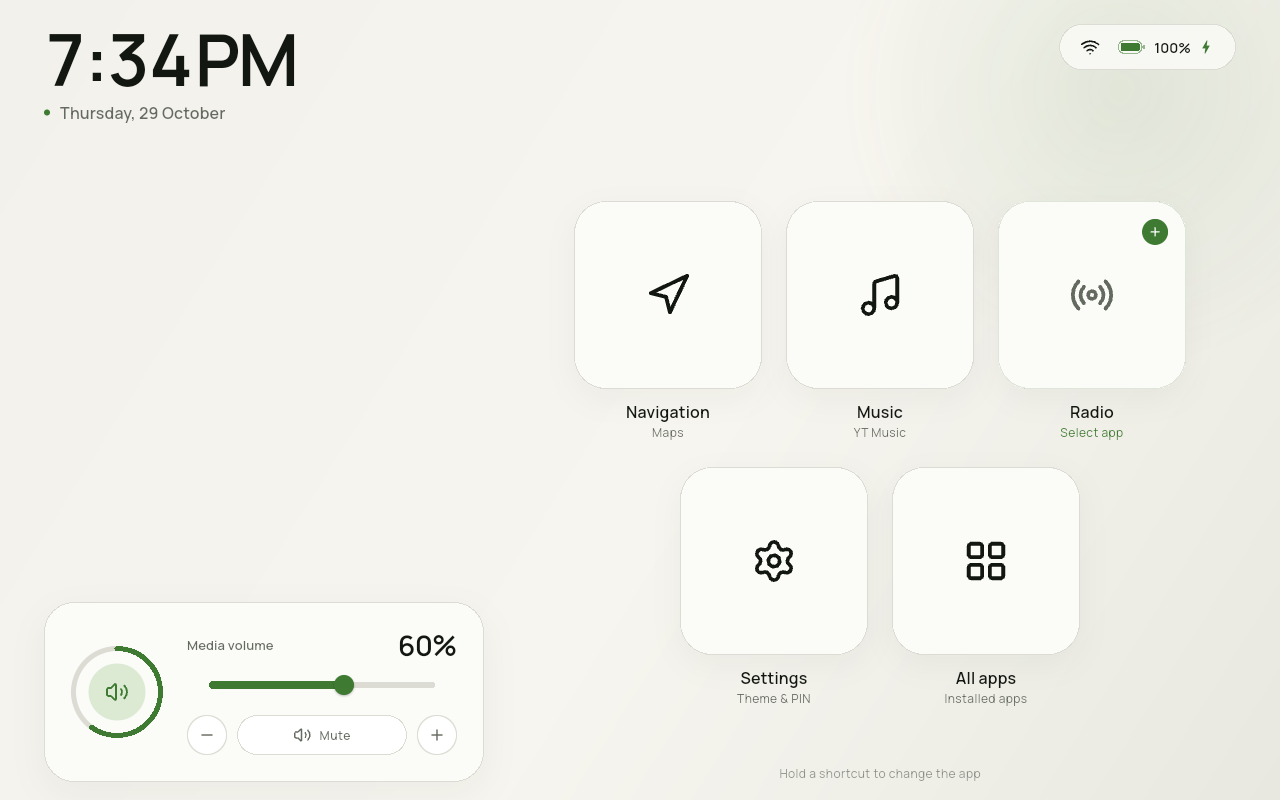 |
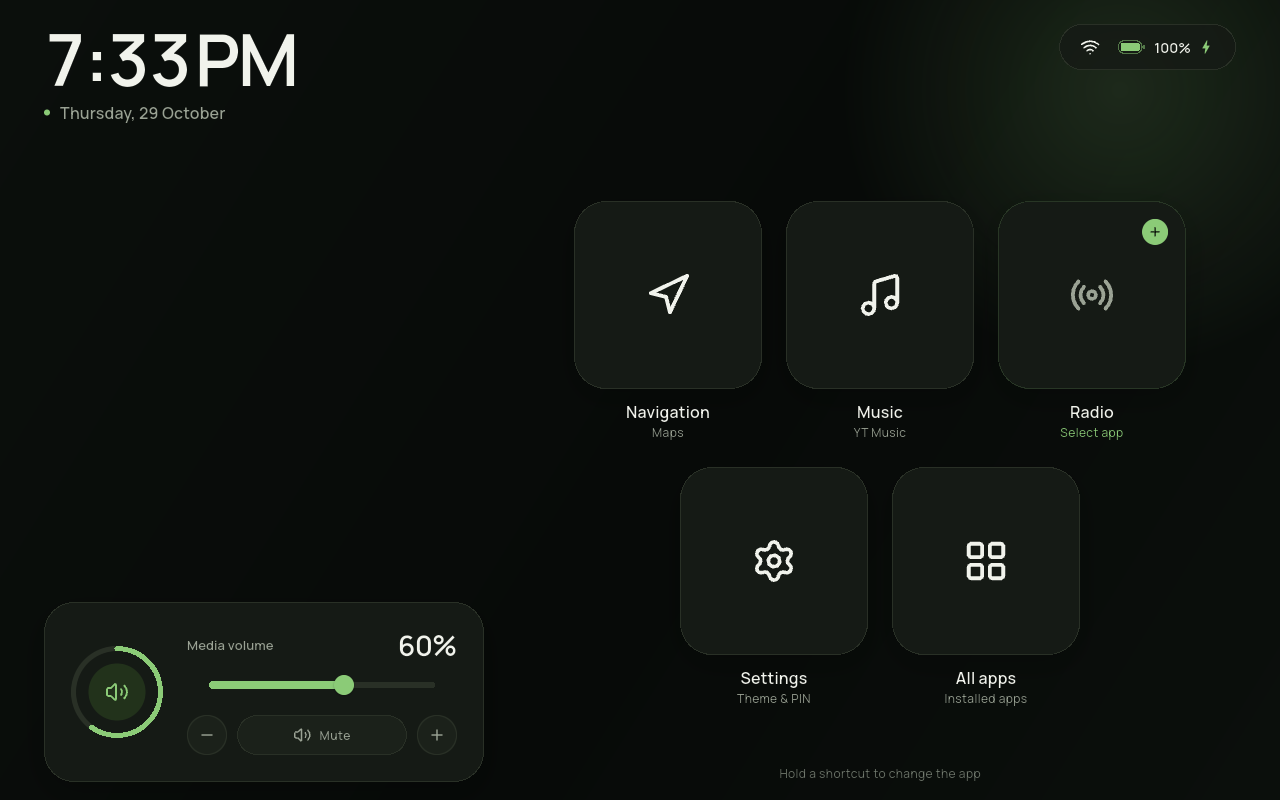 |
Also: Home with top-right Settings · Home at 1024×600 · All apps · app picker · Settings · accent & buttons · Settings · Car data · Settings · Media access · Now playing · Blue accent · user-app icon on Home · pinned-app menu · change-icon grid · PIN lock · 1024×600 layout


Features
- One home screen — no pages, no top bar, no bottom dock; information and controls live on the home page.
- Large clock and date with the device's 12/24-hour preference.
- Battery, charging and Wi-Fi status, with one switch to hide the battery level and charging bolt.
- OBD-II car data — optional Bluetooth Classic ELM327 adapter. Shows digital speed, a throttle bar and rolling 5 km MAF economy, plus ambient temperature when the adapter provides it.
- Location temperature fallback — if OBD has no ambient value, an optional
Settings toggle fetches the current temperature from Open-Meteo using the
device location. The row reads
Outside, 7°Cfor OBD orSofia, 7°Cfor weather, and turns red below 3°C. No network/selection means no row. - Now-playing media card — the circular ring shows song progress around a play/pause button. The song title and artist scroll along the bottom; paused audio stops the scroll and holds its position. When nothing is playing it reads Nothing playing. The volume slider, −/+, and Mute pill remain.
- Now-playing access — Settings → Media grants Android notification access, used only to read the active media session’s title, duration and position. CarDash never reads or stores notification content.
- Configurable home buttons — switches in Settings show or hide Navigation, Music and Radio. All apps is always the last button; Settings now sits next to Wi-Fi in the top-right status area and is no longer a grid tile.
- Pin any app from All Apps — long-press an app to add it to Home. The home page holds up to 16 buttons including All apps, and the grid shrinks as it fills.
- Edit a pinned app — long-press it on Home for Rename, Change icon and Remove. Pinned apps show their own icon by default. Rename changes only the Home label; Change icon offers Default plus 29 monochrome line icons (white on dark, black on light); Remove takes effect without confirmation. Re-add the app from All Apps.
- One-time launcher tip — the first run shows a short notification that the default-launcher setting lives in Settings. It is not shown again.
- All apps — searchable grid of every launchable app, launched full-screen.
- Media-aware Music tile — while media audio is active and the Music shortcut is assigned, the stylized music icon shows a small animated equalizer. Android exposes media-active state, not the playing package, to a normal launcher; see the limitation below.
- Six accent colors — Green, Blue, Amber, Rose, Violet or Teal, applied across the whole interface.
- Screen stays awake while CarDash is in the foreground.
- A short onboarding hint — the long-press hint fades away two minutes after app start, then stays gone.
- Light / Dark / Automatic theme. Automatic uses a fixed local-time window (default 19:00–07:00), editable in Settings.
- Optional PIN — four digits, stored as a salted PBKDF2 hash in Keystore-backed storage. It is requested only when the launcher process cold-starts, never when returning from an app.
- Standard Android home role — no overlay, kiosk or root.
- Android 10+, landscape-only, tablet-first (verified at 1280×800).
- No accounts, no telemetry, no T&C screen. Network access is used only for the optional Open-Meteo temperature fallback.
Requirements
- Flutter 3.47.8 / Dart 3.13.7 (or a compatible newer stable release)
- Android SDK 36, build-tools 36
- JDK 21 for Gradle (the machine default is JDK 27, which is not validated)
- Android 10 (API 29) or newer device/emulator
- A landscape tablet or an emulator; the app locks itself to landscape
- The prepared tablet AVDs use the host GPU; a working GPU driver is recommended
- Optional: a Bluetooth Classic ELM327 adapter already paired in Android
- Optional: location access for the Open-Meteo temperature fallback
The Android application ID is com.wasp.cardash_launcher. Android package
segments cannot contain hyphens, so the requested com.wasp.cardash-launcher
spelling is normalized to an underscore.
export JAVA_HOME=/usr/lib/jvm/java-21-openjdk
export ANDROID_HOME=/opt/android-sdk
export PATH="$ANDROID_HOME/platform-tools:$PATH"
Quick start
flutter pub get
./tool/check.sh

# Boot the prepared 10.1" 1280×800 Android 15 tablet (headless)
./tool/emulator.sh 35

# Build, install, and make CarDash the HOME app
./tool/install.sh debug
If the emulator does not yet exist on another machine, create it with:
sdkmanager "system-images;android-35;google_apis;x86_64"
avdmanager create avd -n cardash_tablet_api35 \
  -k "system-images;android-35;google_apis;x86_64" \
  -d "10.1in WXGA (Tablet)"
The repository also has an Android 10 AVD (cardash_tablet_api29) for
minimum-version checks.
Manual install
flutter build apk --release
adb install -r build/app/outputs/flutter-apk/app-release.apk
adb shell cmd role add-role-holder android.app.role.HOME com.wasp.cardash_launcher
adb shell am start -a android.intent.action.MAIN -c android.intent.category.HOME
On a real tablet, use Settings → General → Home app → Set as default and accept the system prompt. Android will not let an app force itself into the home role silently. CarDash no longer keeps a home-role banner on the dashboard; the first run shows a one-time tip pointing to this setting.
Using CarDash
| Action | Result |
|---|---|
| Tap Navigation / Music / Radio | Open the assigned app full-screen |
| Long-press Navigation / Music / Radio | Pick a different installed app |
| Tap an unassigned shortcut | Open the app picker |
| Settings → Accent | Pick Green, Blue, Amber, Rose, Violet or Teal |
| Settings → Battery & charging | Show or hide battery level and charging bolt |
| Settings → Home buttons switches | Show or hide Navigation, Music, Radio |
| Long-press an app in All Apps | Add it to Home (up to 16 buttons) |
| Long-press an added app on Home | Rename, Change icon or Remove |
| Settings → Car data | Pick a paired ELM327 or None |
| Settings → Car data → Location temperature | Enable GPS weather fallback |
| Temperature row | OBD ambient, or location weather when OBD has none |
| Settings | Theme, accent, media access, battery, home buttons, default-home role, PIN |
| All apps | Search every launchable app; tap to open, hold to pin |
| Music tile while media is active | Shows the selected app icon + equalizer |
| Circular ring | Song progress; tap the centre to play/pause |
| Song title at the card bottom | Scrolls only while playing; holds when paused |
| Screen | Stays awake while CarDash is in front |
| Mute pill | Toggle media mute |
| Slider or − / + | Set media volume |
| Hardware volume keys | Adjust the dashboard's media volume; the slider follows |
The app hides the Android status and navigation bars while CarDash is in the foreground. Swipe from an edge to reveal them temporarily; they hide again when the app resumes.
Settings
General
- Light / Dark / Auto theme.
- Accent: Green, Blue, Amber, Rose, Violet or Teal.
- Battery & charging: one switch hides both the level and charging bolt.
- Auto night window (default dark from 19:00, light from 07:00).
- Home buttons: show/hide Navigation, Music, Radio; live count out of 16.
- Assign the app for each slot; All apps is fixed and last.
- Settings is always available from the gear next to Wi-Fi.
- Home role status and shortcut to the system prompt.
Media
- Notification access for the now-playing title, duration and progress.
- Read-only: CarDash does not read notification content.
- Without access the ring stays empty and the card shows a generic Playing / Nothing playing state.
Car data
- OBD-II adapter dropdown: None plus paired Bluetooth Classic devices.
- Connection status and a Find/Allow action for Bluetooth permission.
- Location temperature toggle: “Show temperature from current location if no OBD-II connected.” Enabling it asks for location permission.
- Read-only note: CarDash never writes to the ECU.
Security
- Set, change or remove a four-digit PIN.
- The PIN is requested only on a cold start. It does not re-lock when switching apps, after screen-off, or after returning from Navigation. This is the agreed behavior, not an oversight.
- The PIN protects the launcher UI. It is not the Android lock screen; set a device screen lock separately for device-level security.
- There is no PIN recovery. Resetting app data removes it.
Architecture
lib/
  core/        design tokens, theme controller, icons, shared widgets
  data/        models, platform services, SettingsRepository (single source of truth)
  features/
    home/      home page, shortcut grid, volume card, OBD/weather controllers
    apps/      All Apps, app-picker sheet
    settings/  General, Car data + Security
    lock/      PIN pad, cold-start lock screen
android/...    MainActivity, LauncherBridge, SystemBridge, TelemetryBridge, ObdService
tool/          emulator, install, check scripts
docs/          implementation plan, design notes
- Flutter owns all UI. Kotlin exposes package enumeration/launching, the HOME role, battery/Wi-Fi, media volume, active media metadata, Bluetooth OBD and one-shot location over method channels.
- The OBD layer is read-only, Bluetooth Classic SPP, bonded devices only. A worker thread serializes ELM327 requests; Flutter polls the latest snapshot.
SettingsRepositoryis the only persistence path. Controllers areChangeNotifiers injected withprovider.- External apps are separate activities; Android has no public API to embed them inside the launcher. This app deliberately accepts full-screen launching for maximum compatibility.
- Full OBD/weather design and hardware notes: docs/OBD_TEMPERATURE.md.
Testing
flutter analyze
flutter test
./tool/check.sh
The 41 tests cover PIN hashing/persistence, settings persistence, theme/accent, dark accent tinting, battery visibility, first-run state, slot visibility, pinned apps, custom labels/icons, the 16-button cap, the dense shortcut grid, the equalizer animation, OBD economy, the OBD card, media-key playback, media metadata/progress, the marquee and the play/pause ring. Native package enumeration, the HOME role, volume, app launching and PIN flows were verified on API 35 and API 29 emulators. Location permission, reverse geocoding and the Open-Meteo fallback were verified live on the API 35 emulator. Now-playing title, artist, progress and pause/resume were verified against a live Chrome MediaSession. The OBD hardware path compiles and is covered by the parser/economy design, but no ELM327 adapter is available on this machine; socket behavior still needs a car test. Release 0.8.0 is installed on the emulator and the physical Android 17 HyperOS tablet.
Troubleshooting the emulator
The prepared AVDs use the host GPU (-gpu host), which is the verified setup on
this machine. Software rendering with SwiftShader segfaulted on the API 35 image.
If your machine has no usable GPU, you can try:
CARDASH_GPU=swiftshader_indirect ./tool/emulator.sh 35
The prepared AVD resolution is 1280×800. If the emulator is already running,
./tool/emulator.sh stop shuts it down before starting a different one. The
Android 15 AVD is left running headlessly after development; use
./tool/emulator.sh 35 window for a visible window.
Compatibility and limitations
- minSdk 29 (Android 10); compile/targetSdk 36. Nothing in the design requires a newer Android release.
- Landscape only (
sensorLandscape). The home page is designed for 1280×800 and remains usable at 1024×600. - 16-button cap includes All apps; Settings lives in the top-right status area and does not consume a slot. Only apps pinned from All Apps show an original app icon by default; the predefined slots, All apps and the Settings gear stay stylized. A pinned icon can be replaced with the Default app icon or the 29 stylized choices.
- Accent-tinted dark theme — dark canvas, surfaces and borders blend toward the selected accent, so Blue no longer shows a green base.
- Media equalizer reacts to system media activity. The now-playing title and progress use the active Android MediaSession, which requires the special notification-access grant in Settings → Media.
- Notification access is used only for media metadata. CarDash does not read notification text or store track history. Revoke it in Android settings at any time; the ring and title then fall back to an empty/generic state.
- Screen-on applies while CarDash is the foreground window. Android can still sleep while another app is in front.
- Onboarding hint is anchored to process start and disappears after two minutes; it does not return until the next cold start.
- No embedded third-party app UI. Navigation/Music/Radio are launched in their own full-screen windows.
- Renaming changes the Home label only. Android does not allow a launcher to rename another app's installed label.
- Custom icons are bundled monochrome SVGs, so they follow the light/dark theme. Default restores the pinned app's own icon.
- Play/pause uses Android media keys. It resumes a paused session when one responds; if nothing is playing, it opens the app assigned to the Music slot (or asks you to choose one). The ring shows Play whenever audio is inactive.
- Song progress/title require notification access. Without it, Android does not expose MediaSession metadata to a normal launcher; the card still controls playback and shows Nothing playing or Playing.
- OBD-II is a subset: Bluetooth Classic SPP only, paired devices only, read-only. Speed, throttle, MAF economy and ambient temperature are implemented; RPM, coolant, voltage, MIL/DTCs, fuel level and BLE/Wi-Fi adapters are not.
- Weather fallback uses Open-Meteo and the device location. It requires location permission and network access; if either is unavailable, the temperature row is hidden. OBD ambient wins whenever present.
- Location data is not stored. Only the selected adapter address and the weather toggle are persisted.
QUERY_ALL_PACKAGESis used to list all launchable apps. It is reasonable for a launcher but requires a Play policy declaration if the app is ever distributed; this is a local/sideload build for now.- Network access is only for the optional Open-Meteo temperature fallback; there are no accounts, ads, telemetry or update checks.
- The launcher cannot replace Android's lock screen. The PIN does not protect a running session, by design.
Design
The visual language is inspired by the TrailCurrent Godwit head unit (MIT): warm neutral surfaces, a selectable instrument accent, large numerals and quiet line icons. It is not a copy of that UI.
- Typeface: Manrope (SIL Open Font License), bundled offline.
- Icons: Lucide (ISC), bundled as SVGs.
- Palette and tokens:
lib/core/theme/app_colors.dart.
Roadmap
- Optional compact now-playing control beside the volume card.
- Real-car ELM327 soak test (speed/throttle/MAF/ambient).
- Release signing configuration.
- Real-device soak test on an Android 10 car tablet.
License
This repository is in local development and has not been pushed or published. A project license has not been chosen yet. Third-party asset licenses: Manrope (OFL) and Lucide (ISC). The design is inspired by TrailCurrent Godwit (MIT).